
PHY Register Control (NXP TJA1101)
PHY Control NXP is a graphical Python utility providing direct register-level access to NXP automotive Ethernet PHY transceivers (TJA1100, TJA1101, TJA1102). It enables configuring Master/Slave clock roles, monitoring physical link status and signal quality (SQI), initiating automated cable tests, and controlling power-saving modes.
Hardware Compatibility: This utility is designed for 100BASE-T1 devices with NXP TJA110x PHYs (FC602, FC612, and custom boards via FC401).
For 10BASE-T1L devices with the Analog Devices ADIN1100 PHY (FC621, FC631), see the PHY Register Control (ADI ADIN1100) guide.
Before you begin
- Broadway2 Driver & Software Setup
- Supported FibreCode Hardware: Ensure at least one compatible 100BASE-T1 device is connected to your host:
Download Software Package
Download phy_control_nxp_Vxx_xx_xx.zip and extract the archive.
Directory structure of the extracted package:
phy_control_nxp_Vxx_xx_xx/
├── phy_control_nxp.py       # Main GUI control application
├── tc10_master.py           # TC10 master automation script
├── tc10_slave.py            # TC10 slave automation script
└── nxp/                     # TJA110x register definitions & PHY modules
    ├── __init__.py
    ├── nxp_tja1100.py
    ├── nxp_tja1101.py
    ├── nxp_tja1101a.py
    ├── nxp_tja1101b.py
    ├── nxp_tja1102.py
    ├── phy_tja1100.py
    ├── phy_tja1101.py
    └── phy_tja1102.py
Launch PHY Control NXP
Navigate to the extracted directory and start the application:
Run from the command line or double-click phy_control_nxp.py in Windows File Explorer:
python phy_control_nxp.py
sudo python3 phy_control_nxp.py
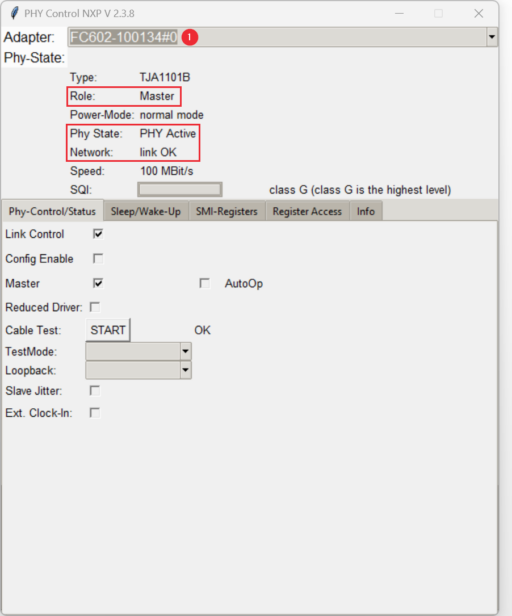
The application window appears:
Connect & Select Device
Select your connected FibreCode adapter from the Adapter drop-down menu at the top:
Once selected, PHY Control NXP queries the transceiver over the Broadway2 API and displays the Phy-State overview in real time:
- Type: Detected NXP transceiver model (e.g.
TJA1101B,TJA1101A,TJA1100, orTJA1102). - Role: Active clock role (
MasterorSlave). - Power-Mode: Current transceiver power state (
normal mode,standby mode, orsleep mode). - Phy State: Transceiver operating state (
PHY Active,PHY Standby, etc.). - Network: Physical layer link verification (
link OKorlink failure). - Speed: Link speed (
100 MBit/sfull duplex). - SQI (Signal Quality Indicator): Real-time signal quality bar graded from
class A(lowest) toclass G(highest, optimum automotive link quality).
Point-to-Point Master/Slave Setup
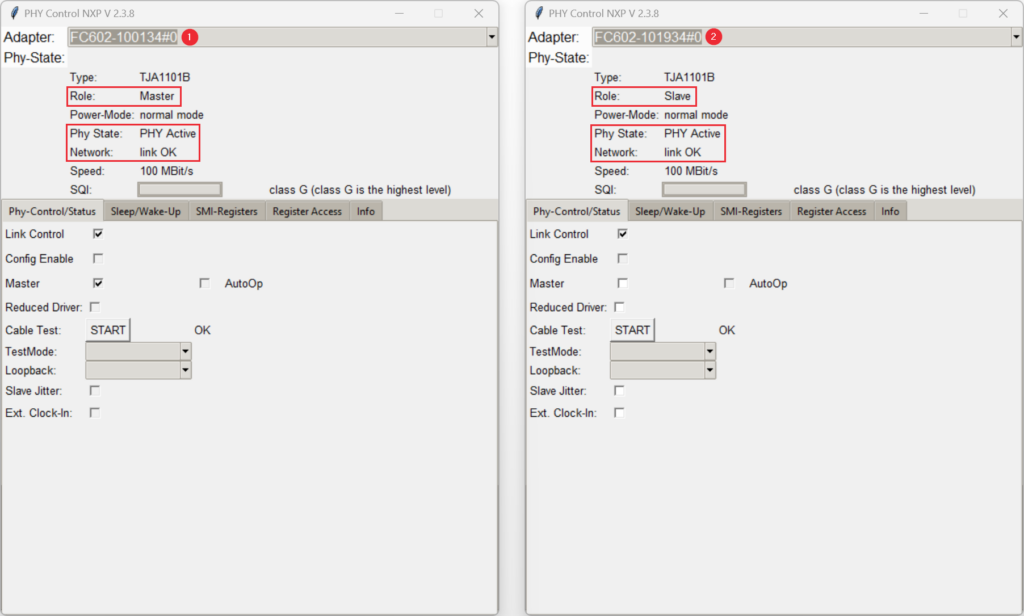
In an automotive 100BASE-T1 network, one communication partner must operate as Master (providing the transmit clock) and the partner device must operate as Slave:
PHY Configuration & Control
The interface is structured into dedicated tabs:
PHY Control & Status
The Phy-Control/Status tab provides direct control over the transceiver:
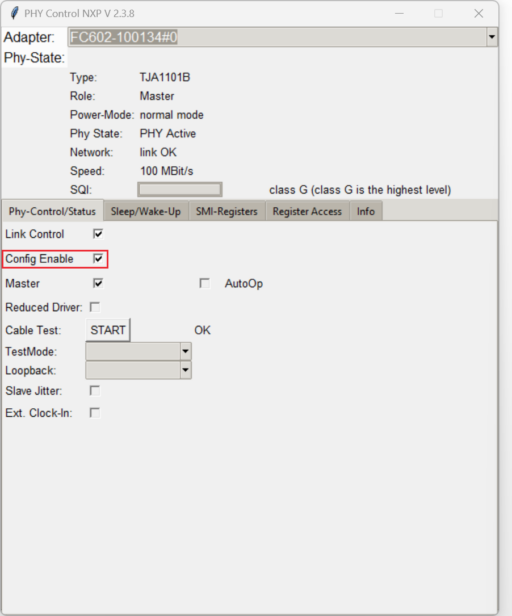
- Config Enable: Write-protection lock. This checkbox must be enabled to modify PHY registers or change modes.
- Link Control: Enables or disables transceiver link training.
- Master: Selects whether the device operates in Master clock mode (checked) or Slave clock mode (unchecked).
- AutoOp: Enables autonomous mode, allowing the PHY state machine to bring up the link automatically after reset or wake-up without host intervention.
- Reduced Driver: Enables reduced transmit driver strength for low-power or radiated emissions testing.
- Cable Test (TDR): Initiates a hardware Time Domain Reflectometry (TDR) test on the twisted pair cable to detect open circuits, shorts, or cable faults.
- TestMode: Selects standardized IEEE compliance test modes (Test Mode 1 through 5) for eye diagram and spectral measurements.
- Loopback: Configures internal digital or analog loopback modes for self-test verification.
- Slave Jitter / Ext. Clock-In: Enables slave jitter test mode or external reference clock input.
Sleep / Wake-up (TC10)
The Sleep/Wake-Up tab provides controls for the OPEN Alliance TC10 automotive power-saving standard:
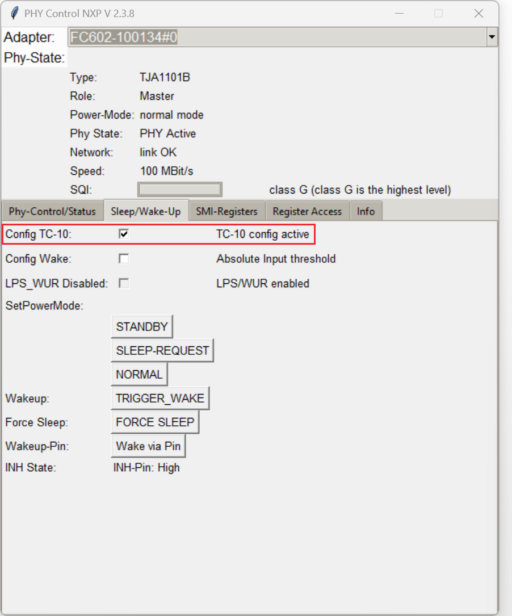
- Config TC-10: Activates OPEN Alliance TC10 functionality on supported PHYs (TJA1101B).
- SetPowerMode: Send state transition commands:
STANDBY: Places the PHY into low-power standby mode.SLEEP-REQUEST: Requests link partner to enter sleep mode.NORMAL: Restores standard operating mode.TRIGGER_WAKE: Sends a wake-up request (WUR / WUP) over the network line.FORCE SLEEP: Forces immediate low-power sleep.
For a complete step-by-step demonstration of sleep and wake-up cycles between two devices, see the TC10 Sleep & Wake-up Demo (NXP) guide.
SMI Registers & Direct Register Access
- SMI-Registers: Displays full register dumps of all IEEE 802.3 Clause 22 and Clause 45 management registers with live bitfield descriptions.
- Register Access: Allows entering arbitrary SMI register addresses and hexadecimal values to read or write directly to any transceiver register for deep debugging and custom register evaluation.
Device Info
The Info tab queries internal Broadway descriptors: - Displays adapter serial number, firmware version, hardware ID, factory MAC address, and persistent Friendly Name (assigned via FC-Control).